For over a decade, the official Meta Pixel Helper Chrome extension has served as the default diagnostic utility for performance marketers and e-commerce webmasters. If the icon turned green and displayed a checkmark next to PageView, AddToCart, or Purchase, teams checked the box and assumed their advertising attribution pipeline was pristine. But if you run a modern Shopify storefront in 2026, relying exclusively on Meta Pixel Helper is one of the most dangerous blind spots in your technology stack.
Over the past two years, Shopify re-engineered its entire tracking architecture. The introduction of Checkout Extensibility, the deprecation of additional_scripts, and the mandatory transition to Shopify Customer Events (Web Pixels API) fundamentally severed the legacy Meta Pixel Helper from the data stream. On millions of modern Shopify stores, the extension reports red warning flags on fully functioning setups, or worse, displays a calm green checkmark while thousands of dollars in purchase conversion telemetry are silently leaking into the void.
In this comprehensive architectural analysis, we examine why the legacy Meta Pixel Helper has become obsolete on modern Shopify stores, break down the technical sandbox barriers preventing it from inspecting Web Pixels, and provide an in-depth comparison of the best modern alternatives available for growth engineers and technical founders.
🔍 Direct Answer: Why Does Meta Pixel Helper Fail on Modern Shopify Stores?
Meta Pixel Helper fails because it was designed for traditional monolithic storefronts where tracking scripts run directly on the top-level window object. On modern Shopify stores:
- Web Pixels Sandbox Isolation: Shopify Customer Events run inside an isolated, cross-origin iframe Web Worker sandbox (
wpm@...). The globalwindow.fbqobject does not exist in the top-level DOM, so Meta Pixel Helper reports "No pixel found" even when events are firing successfully. - Server-Side CAPI Blindness: Meta Pixel Helper has zero visibility into server-side Conversions API (CAPI) signals. It cannot verify whether
event_idmatches between browser and cloud, leaving deduplication errors and duplicate purchases completely invisible. - Zero Financial Context: When an event fails, the extension offers no revenue impact calculation or multi-channel reconciliation against GA4 and TikTok.
The Architecture of Obsolescence: How Shopify Broke the Classic Extension
To understand why you need a modern alternative, you must examine how Shopify's tracking architecture changed between vintage themes and modern Online Store 2.0 checkout flows.
1. The Death of window.fbq in the Main DOM
In legacy Shopify stores, merchants pasted Meta's snippet directly into theme.liquid and checkout.liquid. This script registered a global function:
// Vintage Architecture (Direct Global Injection)
<!-- Placed in theme.liquid & checkout.liquid -->
<script>
!function(f,b,e,v,n,t,s){if(f.fbq)return;n=f.fbq=function(){...};
f._fbq=n;n.push=n;n.loaded=!0;n.version='2.0';
...
fbq('init', '1234567890');
fbq('track', 'PageView');
</script>
The classic Meta Pixel Helper extension simply injected a content script into the top-level DOM, hooked into window.fbq, and listened for calls pushed to the queue.
With Shopify Checkout Extensibility and the Web Pixels API, tracking code is strictly banned from executing in the top-level document of the checkout and order status pages. Instead, Shopify spawns an isolated sandboxed iframe:
// Modern Shopify Web Pixel Sandboxed Environment
<!-- Rendered at the bottom of the checkout document -->
<iframe
  id="web-pixel-sandbox-CUSTOM-meta-pixel"
  src="https://store.myshopify.com/wpm@.../sandbox/worker"
  sandbox="allow-scripts allow-forms"
  style="display:none;">
</iframe>
Inside this sandbox, the script has no direct access to window.parent, document.cookie, or the top-level window scope. When Meta Pixel Helper inspects the page, it searches for window.fbq on the parent frame, finds nothing, and either reports that no pixel exists or displays stale metadata from a third-party app.
LEGACY MONOLITHIC STOREFRONT (Pre-2024):
┌───────────────────────────────────────────────────────────┐
│ Browser Tab: myshopify.com/checkouts/xyz                  │
│                                                           │
│  window.fbq = function() { ... }  ◄─── [Meta Pixel Helper]│
│  window.dataLayer = [ ... ]           Can read and hook   │
│  fbq('track', 'Purchase', { ... })    directly into DOM!  │
└───────────────────────────────────────────────────────────┘

MODERN SHOPIFY OS 2.0 + CHECKOUT EXTENSIBILITY (2026):
┌───────────────────────────────────────────────────────────┐
│ Browser Tab: myshopify.com/checkouts/co/xyz               │
│                                                           │
│  Top-Level Window DOM (Zero Tracking Scripts Allowed)     │
│                                                           │
│  ┌─────────────────────────────────────────────────────┐  │
│  │ Sandboxed Iframe (wpm@.../sandbox/worker)           │  │
│  │  - Isolated Web Worker Context                      │  │
│  │  - analytics.subscribe('checkout_completed')        │  │
│  │  - Outgoing HTTP POST to facebook.com/tr/           │  │
│  └─────────────────────────────────────────────────────┘  │
│                                                           │
│  [Meta Pixel Helper Extension]                            │
│   ❌ Cannot read sandbox memory                           │
│   ❌ Reports "No pixel found on this page"                │
│   ❌ Completely blind to checkout_completed telemetry     │
└───────────────────────────────────────────────────────────┘
2. The Conversions API (CAPI) Deduplication Void
Modern DTC brands utilize redundant tracking: a browser pixel beacon paired with a server-to-server Conversions API payload dispatched by Shopify's servers, Elevar, Littledata, or a custom Cloudflare Worker.
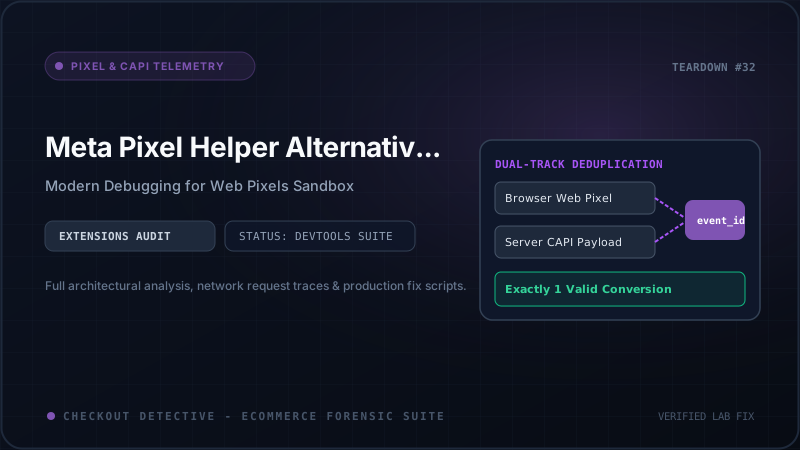
For Meta to deduplicate these events accurately, both payloads must transmit an identical event_name and event_id within a 48-hour deduplication window. The legacy Meta Pixel Helper only inspects client HTTP requests—it has no knowledge of when, or if, the server payload was dispatched. If your server payload transmits an event_id of shopify_102938 while your client pixel transmits checkout_102938, deduplication fails. Meta logs two distinct purchases, inflates your in-platform ROAS by 100%, and causes your media buyers to overspend on unprofitable ad sets. Meta Pixel Helper is powerless to warn you.
3. The Delta Timestamp Trap: Why Arrival Order Matters
A critical architectural dimension that Meta Pixel Helper completely ignores is delta timestamp latency. In an ideal telemetry setup, the browser pixel fires immediately upon checkout completion (at timestamp T_0), while the server webhook or CAPI payload arrives at Meta's ingestion endpoints within a few seconds (at timestamp T_server).
However, during flash sales, BFCM traffic surges, or when third-party server-side tracking apps experience queue congestion, the server CAPI payload can be delayed by 45 minutes to several hours. If a customer revisits their order status page or refreshes their receipt before the server event arrives, client-side scripts can emit a duplicate Purchase beacon. If the timestamp delta exceeds Meta's strict deduplication buffer or if client and server timestamps drift significantly, Meta's ingestion pipeline treats them as two distinct conversion events from the same user.
Legacy extensions only show you what fired in the current tab at the current second; they provide zero visibility into server queue latency, timestamp synchronization, or whether your server-side payload beat the browser beacon to Meta's servers.
4. Multi-Currency Mismatches and Value Corruption in Shopify Markets
Another severe attribution flaw occurs on global stores using Shopify Markets. A European shopper browsing in EUR may complete a checkout processed in USD, or vice versa. In poorly architected theme integrations, the client pixel transmits currency: 'EUR' and value: 120.00, while the server-side CAPI payload reads Shopify's base currency transaction of currency: 'USD' and value: 130.50.
When Meta receives conflicting conversion values under the same event_id, its attribution engine either drops the conversion value entirely or flags an Event Quality warning that degrades your campaign bidding algorithm. The legacy Meta Pixel Helper cannot cross-reference currencies between client and server, leaving international brands hemorrhaging attribution accuracy silently.
Top 4 Meta Pixel Helper Alternatives Reviewed
To maintain telemetry integrity on modern Shopify stores, technical growth teams are retiring the legacy helper in favor of advanced developer extensions. Here is how the top four alternatives compare:
1. Checkout Detective Editor's Choice: Built for Shopify
Best For: Shopify Plus & DTC brands needing end-to-end verification across Web Pixels, CAPI deduplication, and checkout button stability.
Unlike generic packet sniffers, Checkout Detective was engineered specifically for Shopify's modern architecture. It automatically intercepts Shopify Customer Events Web Pixels within their sandboxed frames, monitors postMessage bridges, and compares outgoing browser beacons against server CAPI payloads in real time.
- Native Web Pixel Sandbox Inspection: Decodes and displays
checkout_completed,payment_info_submitted, andproduct_added_to_cartdirectly from isolated worker frames. - CAPI Event ID Parity: Automatically cross-references
event_idand flags delta timestamp latency issues between client and server signals. - Revenue Impact Modeling: Translates missing purchase events into estimated monthly lost attribution dollar values.
- Multi-Pixel Engine: Audits Meta, TikTok, and GA4 simultaneously in a unified timeline.
2. Meta Ads Data Advisor (MADA)
Best For: Diagnosing Event Quality Scores (EQS) within the official Meta ecosystem.
Developed by Meta's internal engineering team as a successor to the basic pixel helper, MADA provides deeper diagnostics into Advanced Matching parameters. It highlights whether customer data (email, phone, city) is properly SHA-256 hashed before transmission.
- Strengths: Deep insight into Meta's match quality algorithms; identifies unhashed PII violations.
- Limitations: Limited support for sandboxed checkout extensions; zero visibility into competitor networks (TikTok, GA4); cannot model financial attribution loss.
3. TagHound Analytics Inspector
Best For: Enterprise agency QA teams auditing multi-vendor martech stacks.
TagHound operates as a comprehensive beacon interceptor across hundreds of martech vendors. It parses outgoing network requests and organizes them by tag category (Analytics, Advertising, Functional).
- Strengths: Clean, structured UI; filters requests by vendor; exports audit logs to JSON.
- Limitations: Lacks Shopify-specific heuristics; does not understand Shopify checkout stages or liquid data layers; requires manual interpretation of raw query parameters.
4. Omnibug DevTools Integration
Best For: Hardcore frontend engineers and data layer architects comfortable reading raw HTTP payloads.
Omnibug lives as an embedded tab inside Chrome Developer Tools rather than a popup extension. It captures outgoing POST and GET requests to known analytics providers (Meta, Google, Adobe, Mixpanel) and decodes URL-encoded parameters into readable key-value trees.
- Strengths: Unfiltered raw network access; zero overhead; inspects every network request regardless of iframe origin.
- Limitations: Steep learning curve; no automated problem detection; does not calculate deduplication success or alert on missing parameters.
Comprehensive Feature Comparison Matrix
To help your engineering team choose the right diagnostic tool for your Shopify store, we evaluated all five utilities across critical e-commerce criteria:
| Diagnostic Tool | Shopify Web Pixel Sandbox | CAPI Deduplication & event_id | Multi-Pixel (Meta/GA4/TikTok) | Revenue Impact Calculation | Primary Best Fit |
|---|---|---|---|---|---|
| Classic Meta Pixel Helper | ❌ Blind to Sandbox | ❌ No Server Visibility | ❌ Meta Only | ❌ None | Legacy non-Shopify sites |
| Meta Ads Data Advisor | ⚠️ Partial Support | ⚠️ Event Quality Only | ❌ Meta Only | ❌ None | Advanced matching audits |
| TagHound | ⚠️ Network Level Only | ❌ Manual verification | ✅ Multi-Vendor | ❌ None | Agency broad tag inventory |
| Omnibug | ✅ Raw Frame Sniffing | ⚠️ Requires manual diffing | ✅ Comprehensive | ❌ None | Technical payload debugging |
| Checkout Detective | ✅ Automated Native Decoupling | ✅ Automated event_id & Delta Sync | ✅ Meta, TikTok & GA4 | ✅ Real-Time Financial Impact | Modern Shopify Stores & Plus |
Step-by-Step Diagnostic Protocol for Shopify Pixel Audits
To execute a bulletproof audit of your Meta Pixel and CAPI installation on a modern Shopify theme, follow this professional forensic sequence:
Step 1: Check for Ghost Pixels in theme.liquid
Open Chrome DevTools, open your theme source, and search for fbevents.js or fbq('init'. If you have active pixels in theme.liquid while simultaneously running the official Shopify Facebook & Instagram Sales Channel (which uses Web Pixels), your store is firing duplicate PageView and ViewContent beacons on every single page. Remove any hardcoded theme scripts immediately.
Step 2: Inspect Sandboxed PostMessages in Web Pixels
In DevTools Console, filter messages for wpm@ or Customer Events. Trigger an AddToCart action. Confirm that the Customer Events engine dispatches the event and that the sandboxed worker successfully emits an outbound HTTP POST to https://www.facebook.com/tr/ containing your pixel ID and parameters.
Step 3: Verify event_id Consistency Across CAPI
Complete a test order on your development store. Inspect the payload sent by your browser beacon for the Purchase event. Locate the eid (event ID) parameter. Next, open Meta Events Manager > Test Events, and locate the corresponding server-side event dispatched by Shopify. Ensure that the event_id strings match character-for-character. If one is prefixed with shopify_order_ and the other contains only numeric digits, Meta will count the order twice.
Upgrade Your Pixel Debugging with Checkout Detective
Stop wasting hours cross-referencing cryptic network payloads and guessing why Meta Pixel Helper shows confusing errors. With Checkout Detective, your marketing and engineering teams gain real-time, automated visibility into your entire Shopify tracking pipeline.
Checkout Detective hooks directly into Shopify Customer Events, isolates sandboxed pixel activity, continuously tests CAPI event deduplication parity, and warns you the second a checkout UI extension or app update breaks your purchase attribution.
Ditch the Obsolete Helper: Gain Real-Time Telemetry
Checkout Detective was purpose-built for Shopify Online Store 2.0 and Checkout Extensibility. Audit your Meta, TikTok, and GA4 pixels, detect deduplication bugs, and eliminate blind ad spend waste today.
Install Checkout Detective Chrome Extension Free