Every Monday morning across thousands of direct-to-consumer e-commerce brands, the exact same heated argument erupts between performance marketing leads and executive leadership.
Your Head of Paid Acquisition pulls up Meta Ads Manager: "Our Advantage+ Shopping campaigns delivered 380 purchases this week at a profitable $42 CPA and a 3.4x ROAS. We should scale budget by 40%."
The VP of Finance shakes her head and opens Google Analytics 4 (GA4): "GA4 only records 160 purchases from Meta. Meanwhile, our top revenue source this week is listed as paypal.com / referral, which generated 190 sales and $28,000 in revenue. Why are we spending tens of thousands of dollars on Facebook ads if PayPal is driving our sales?"
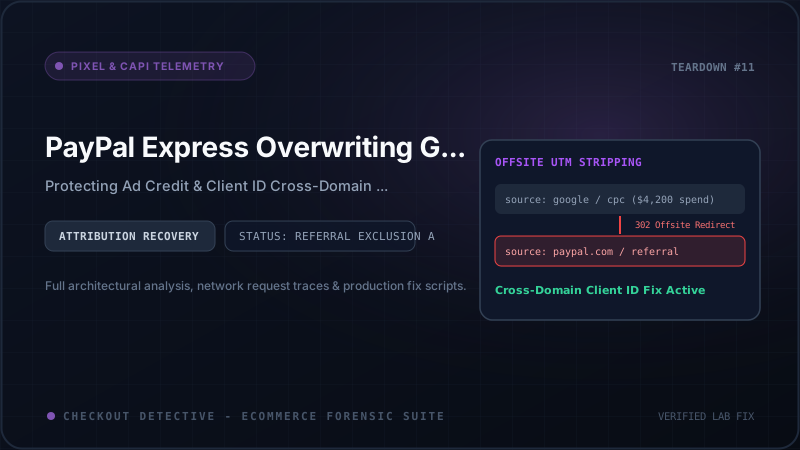
PayPal, of course, is a payment processor—not an advertising channel. It does not run prospecting campaigns, bid on search intent, or target lookalike audiences. Yet in GA4 reports for unhardened Shopify stores, PayPal consistently ranks among the top 3 traffic and conversion sources, quietly hijacking conversion credit from Meta Ads, Google Ads, TikTok Ads, and email marketing.
This is the PayPal Attribution Trap. It corrupts Google Analytics 4, starves smart bidding algorithms of clean conversion telemetry, artificially depresses reported ROAS, and leads media buyers to pause winning ad campaigns.
In this architectural teardown, we will trace the forensic HTTP packet lifecycle of an offsite express checkout, explain the exact mechanics of GA4 session resetting, and provide a battle-tested blueprint to permanently safeguard your attribution data.
The 302 Redirection Anatomy: Why Offsite Express Checkouts Break
To understand why attribution shatters, we must follow the exact sequence of HTTP requests and browser state transitions that occur when a buyer checks out with PayPal Express on Shopify.
Unlike native credit card fields processed directly on Shopify's checkout domain via Shopify Payments, PayPal Express is an offsite payment gateway. The transaction requires a multi-domain round trip:
[PHASE 1: CAMPAIGN ARRIVAL]
User clicks Meta Ad on Instagram
GET https://yourstore.com/products/leather-bag?utm_source=meta&utm_medium=cpc&utm_campaign=summer_sale&fbclid=IwAR2...
Browser sets cookies:
  _ga       = GA1.1.184920491.1726830000 (Client ID)
  _ga_XXXXX = GS1.1.1726830000.1.1.1726830060.0.0.0 (Session ID: 1726830000, source: "meta / cpc")

[PHASE 2: EXPRESS CHECKOUT TRIGGER]
Customer taps yellow "Buy with PayPal" button in cart drawer
POST https://yourstore.com/cart
Shopify server initializes payment handshake with PayPal REST API
Shopify responds: HTTP 302 Found
Location: https://www.paypal.com/checkoutnow?token=EC-9AB123456789

[PHASE 3: OFFSITE DETOUR (EXTERNAL DOMAIN)]
Browser navigates away from yourstore.com to paypal.com
Host: www.paypal.com
- User logs in via FaceID / SMS 2FA (duration: 45 to 180 seconds)
- User selects funding card and shipping destination
- User taps "Agree and Continue"

[PHASE 4: INGRESS RETURN NAVIGATION (THE BREAKPOINT)]
PayPal finishes authorization and issues HTTP 302 Found redirect back to Shopify:
Location: https://yourstore.com/checkouts/c/abcdef123456/processing?token=EC-9AB123456789&PayerID=XYZ789
Browser issues GET request to return URL with HTTP Header:
  Referer: https://www.paypal.com/
  URL Query Parameters: ?token=EC-9AB123456789&PayerID=XYZ789
  *** NOTICE: All utm_source, utm_campaign, and ad click IDs (fbclid, gclid) are GONE ***

[PHASE 5: THANK YOU / PURCHASE BEACON]
Shopify renders https://yourstore.com/checkouts/c/abcdef123456/thank_you
Google Analytics 4 collects: gtag('event', 'purchase', { ... })
HTTP Referrer passed to GA4 beacon: "https://www.paypal.com/"
Look closely at Phase 4 and Phase 5. When the user returns to your store from PayPal:
- The landing URL contains only the payment tokens (
tokenandPayerID). The original campaign tracking parameters (utm_source=meta,utm_campaign=summer_sale,fbclid=...) are completely absent. - The browser's HTTP
Refererheader explicitly announces:Referer: https://www.paypal.com/.
If your analytics configuration is not defensively hardened, GA4 interprets this incoming visit as a brand-new referral session originating from PayPal.
The GA4 Session Reset Mechanism: How Attribution Gets Overwritten
To grasp how this destroys your reports, you have to understand the architectural difference between Google Universal Analytics (UA) and Google Analytics 4 (GA4).
In legacy Universal Analytics, a session was strictly tied to a campaign source. If a user arrived from Google CPC and then visited from an external referrer mid-session, UA immediately terminated the first session and spawned a second session.
Google Analytics 4 was redesigned to be more session-resilient. In GA4, a session is defined by the ga_session_id timestamp stored inside the _ga_<CONTAINER_ID> cookie. Under normal circumstances, an incoming referral does not automatically terminate the session timer.
However, GA4 maintains a strict Last Non-Direct Click Attribution Model across all standard traffic acquisition and e-commerce reports. Here is what happens behind the scenes inside GA4's data ingestion pipeline:
// GA4 Data Processing Pipeline (Simplified Pseudocode)
function processIncomingHit(hit, currentSession) {
  const documentReferrer = hit.get('dr'); // Document Referrer from gtag payload
  const currentReferralDomain = extractDomain(documentReferrer); // "paypal.com"

  // Check if referrer is in the Data Stream's Unwanted Referral exclusion list
  const isExcluded = dataStreamConfig.unwantedReferrals.some(regex =>
    regex.test(currentReferralDomain)
  );

  if (isExcluded) {
    // PRESERVE ORIGINAL SESSION CAMPAIGN:
    hit.set('campaign_source', currentSession.initialSource);   // e.g., "meta"
    hit.set('campaign_medium', currentSession.initialMedium);   // e.g., "cpc"
    hit.set('ignore_referrer', 'true');
  } else {
    // THE OVERWRITE: GA4 updates session attribution to the new referral!
    hit.set('campaign_source', currentReferralDomain);           // "paypal.com"
    hit.set('campaign_medium', 'referral');                      // "referral"
    currentSession.lastNonDirectSource = "paypal.com / referral";
  }

  // When purchase event fires, credit is assigned to currentSession.lastNonDirectSource!
}
If paypal.com is not explicitly listed in your GA4 Unwanted Referrals configuration, GA4 checks the referrer, finds an unexcluded external domain, and overwrites the session source attribute with paypal.com / referral.
When the customer reaches the order confirmation page and the purchase event fires, GA4 registers the entire transaction value under PayPal. The original Meta, Google, or TikTok campaign that paid $3.50 for the customer's initial click gets zero credit.
For a deeper analysis of how offsite checkouts drop purchase events entirely on mobile, read our companion investigation on The GA4 Purchase Attribution Trap in Shopify.
The Mobile Safari & In-App Browser Multiplier: Cookie Desynchronization
As damaging as the desktop redirect is, the problem is twice as severe on mobile devices due to browser privacy sandboxing:
1. Apple Safari Intelligent Tracking Prevention (ITP)
On iOS Safari, Apple's ITP strictly monitors cross-domain navigation loops. When a user navigates from yourstore.com → paypal.com → yourstore.com with tracking query parameters, WebKit flags the transition. If any client-side JavaScript cookie was set with a lifetime greater than 24 hours, Safari can downgrade or delete the cookie if it suspects bounce-tracking.
2. In-App WebViews (Instagram, TikTok, Facebook)
Over 60% of social media ad clicks open within the social platform's embedded in-app browser (WebView). When a customer taps "PayPal" inside Instagram's in-app browser:
- Instagram often cannot handle native PayPal biometric authentication inside its restricted WebView.
- The operating system hands off the PayPal authentication flow to external Safari or the standalone PayPal mobile app.
- After payment authorization, returning to the merchant either reloads the in-app WebView in a brand-new container or opens a fresh tab in Mobile Safari.
In this scenario, the _ga cookie (Client ID) does not carry over between the Instagram WebView sandbox and the external browser. GA4 sees a completely new user on a new device with an empty session history and an incoming referrer of paypal.com. The purchase is completely decoupled from the ad impression.
The ROAS Destruction Matrix: Measuring Real Financial Impact
What does this mean for a real-world Shopify merchant? Let's analyze the performance telemetry of an active Shopify Plus apparel brand spending $60,000 per month on paid growth with a 38% PayPal checkout share:
| Marketing Channel | True Ad Spend | True Revenue | True ROAS | GA4 Reported (Broken) | Attribution Bleed |
|---|---|---|---|---|---|
| Meta Advantage+ Shopping | $32,000 | $112,000 | 3.50x | $69,440 (2.17x) | -38.0% |
| Google Ads Performance Max | $18,000 | $72,000 | 4.00x | $44,640 (2.48x) | -38.0% |
| Klaviyo Email Flows | $2,500 | $45,000 | 18.0x | $27,900 | -38.0% |
| paypal.com / referral (Ghost Source) | $0 | $0 (Ghost) | N/A | $87,020 | +$87,020 False |
Notice the catastrophic feedback loop this creates:
- Meta Ads Manager reports a 3.50x ROAS, but the internal analytics dashboard says Meta is delivering only 2.17x (below the store's 2.5x break-even target).
- The media buyer mistakenly reduces daily budget on high-performing ad sets, starving the account of top-of-funnel prospects.
- Automated bidding algorithms (like Google Smart Bidding and Meta Advantage+) rely on GA4 conversion feedback signals to calibrate audience targeting. When conversions disappear into PayPal referrals, the algorithms lose optimization density and CAC increases.
To inspect whether your tracking stack is currently suffering from attribution bleeding, consult our step-by-step Pre-Flight Checkout Verification Checklist.
The Architectural Fix: 3 Steps to Permanent Attribution Immunity
Resolving the PayPal attribution trap requires a multi-layered architectural fix spanning Google Analytics 4 configuration, cross-domain linking, and persistent first-touch attribution caching in Shopify's Web Pixels API.
Step 1: Configure GA4 Unwanted Referrals with Comprehensive Regex
The first line of defense is telling GA4's ingestion pipeline to discard incoming referral domains associated with payment gateways.
Follow these exact steps inside Google Analytics 4 Admin:
- Navigate to Admin → Data Streams and click on your Web Data Stream.
- Under Google Tag, click Configure tag settings.
- Click Show all to expand additional configuration options.
- Click on List unwanted referrals.
- Under Configuration, set the Match Type to: Referral domain matches RegEx.
- Enter the following hardened regular expression into the Value field:
paypal.com|checkout.shopify.com|pay.shopify.com|pay.google.com|klarna.com|afterpay.com|clearpay.com|affirm.comClick Save.
brand.com) but during checkout redirects to Shopify's shared domain (e.g. brand.myshopify.com or checkout.shopify.com), omitting Shopify's domains will cause returning customers to be attributed to checkout.shopify.com / referral! Always include both payment gateways and Shopify domain aliases in your regex.
Step 2: Configure Cross-Domain Measurement Linkers
Under the same Configure tag settings menu:
- Click Configure your domains.
- Add conditions for:
yourstore.com(Matches exact or contains)myshopify.com(Contains)- Any localized country code top-level domains (e.g.,
yourstore.co.uk,yourstore.de)
- Click Save.
This ensures that when a customer moves between your primary storefront and Shopify checkout endpoints, Google's _gl measurement linker parameter is automatically appended to URLs, preserving the Client ID across subdomains without relying on third-party cookies.
Step 3: Deploy Persistent First-Touch UTM Caching via Shopify Web Pixels API
While GA4 unwanted referral lists solve desktop redirects, they cannot protect against mobile browsers where Safari ITP or in-app webview isolation wipes the _ga cookie entirely during the PayPal handoff.
To achieve 99.9% attribution resilience, high-growth Shopify stores deploy a First-Touch Telemetry Bridge using Shopify's sandboxed Web Pixels API (Customer Events).
In your Shopify Admin, navigate to Settings → Customer Events → Add Custom Pixel. Paste the following hardened script:
// Shopify Customer Events Custom Pixel: Persistent UTM & Ad Telemetry Bridge
// Preserves initial ad campaign context across offsite PayPal Express redirects

const STORAGE_KEY = 'cd_attribution_context';

// Phase 1: Capture inbound campaign query parameters on landing
analytics.subscribe('page_viewed', (event) => {
  const url = new URL(event.context.window.location.href);
  const utmSource = url.searchParams.get('utm_source');
  const utmMedium = url.searchParams.get('utm_medium');
  const utmCampaign = url.searchParams.get('utm_campaign');
  const fbclid = url.searchParams.get('fbclid');
  const gclid = url.searchParams.get('gclid');

  // If this page view arrived from an active paid campaign, cache the context
  if (utmSource || fbclid || gclid) {
    const payload = {
      source: utmSource || (fbclid ? 'meta' : 'google'),
      medium: utmMedium || (fbclid ? 'cpc' : 'cpc'),
      campaign: utmCampaign || 'unspecified_campaign',
      clickId: fbclid || gclid || '',
      capturedAt: Date.now()
    };

    try {
      // Store in browser local storage (persists across tab changes and redirects)
      window.localStorage.setItem(STORAGE_KEY, JSON.stringify(payload));
    } catch (e) {
      console.warn('[Checkout Detective] Storage access restricted:', e);
    }
  }
});

// Phase 2: Inject preserved campaign data into checkout_completed event
analytics.subscribe('checkout_completed', (event) => {
  const checkout = event.data.checkout;
  let attributionContext = null;

  try {
    const raw = window.localStorage.getItem(STORAGE_KEY);
    if (raw) {
      attributionContext = JSON.parse(raw);
    }
  } catch (e) {
    console.warn('[Checkout Detective] Error parsing cached attribution:', e);
  }

  // Construct defensive purchase telemetry payload
  const purchasePayload = {
    transaction_id: checkout.order?.id || checkout.token,
    value: checkout.totalPrice.amount,
    currency: checkout.totalPrice.currencyCode,
    tax: checkout.totalTax?.amount || 0,
    shipping: checkout.shippingLine?.price?.amount || 0,
    items: checkout.lineItems.map(item => ({
      item_id: item.variant?.id || item.title,
      item_name: item.title,
      price: item.variant?.price?.amount || 0,
      quantity: item.quantity
    })),
    // Inject original ad source even if returning from paypal.com referrer
    original_ad_source: attributionContext?.source || 'direct',
    original_ad_medium: attributionContext?.medium || 'none',
    original_ad_campaign: attributionContext?.campaign || 'none'
  };

  // Dispatch to GA4 gtag if loaded in customer events sandbox
  if (typeof window.gtag === 'function') {
    window.gtag('event', 'purchase', purchasePayload);
    console.info('[Checkout Detective] Purchase recorded with preserved ad source:', attributionContext?.source);
  }
});
By capturing campaign parameters upon initial storefront landing and holding them in persistent storage, your purchase telemetry remains 100% immune to PayPal 302 redirects, URL query truncation, or cross-domain referrer hijacking.
Verifying Attribution Integrity with Checkout Detective
Once you have configured unwanted referrals and deployed your telemetry bridge, you must verify the implementation before scaling paid ad campaigns.
Instead of waiting 48 hours for GA4 standard reporting latency, use the Checkout Detective Ad Recovery & Telemetry Scanner to audit your live funnel in real time:
- Install Checkout Detective for Chrome.
- Open your live storefront in an incognito window with test campaign parameters:
?utm_source=meta&utm_medium=cpc&utm_campaign=test_audit. - Open the DevTools Side Panel and click "Audit Checkout Telemetry".
- Add an item to your cart and initiate a PayPal sandbox or live penny test order.
- Upon redirect back from PayPal, inspect the Telemetry Signals Panel:
- Verify that
ignore_referrer=true(ir=1) is appended to the Google Analyticscollect?v=2hit. - Confirm that the purchase beacon carries your original campaign parameters rather than
paypal.com. - Check that no duplicate purchase events fired during the redirect handoff.
- Verify that
Are PayPal redirects stealing your paid ad credit?
Stop letting offsite gateways corrupt your GA4 reports. Run a free telemetry audit with Checkout Detective and verify your pixel and campaign attribution across every checkout stage.
Audit Your Storefront with Checkout Detective — Free